Choose a plan and billing cadence
Open Account → Plan & billing.
What the plans cost
| Basic | Premium | |
|---|---|---|
| Monthly | $39 | $79 |
| Annual | $398 (about $33/month) | $806 (about $67/month) |
Annual saves about 15%. The toggle at the top of Plan & billing reads Monthly / Annual, save 15%.
What you get
Both plans include your storefront, unlimited menu weeks, orders, customers, packages and subscriptions, and the printable flyer. Stovefront takes 0% of your food sales on either plan.
Premium adds:
- Up to 25 pickup locations (Basic has 2)
- Recipe costing and the Benchmarks workspace
- The Storage pantry tool
- A custom domain for your storefront
- 100 AI food images per month
Choosing
- Open Account → Plan & billing.
- Pick Monthly or Annual, save 15%.
- Select Choose Basic or Choose Premium.
- Enter your payment details in the secure checkout that opens.
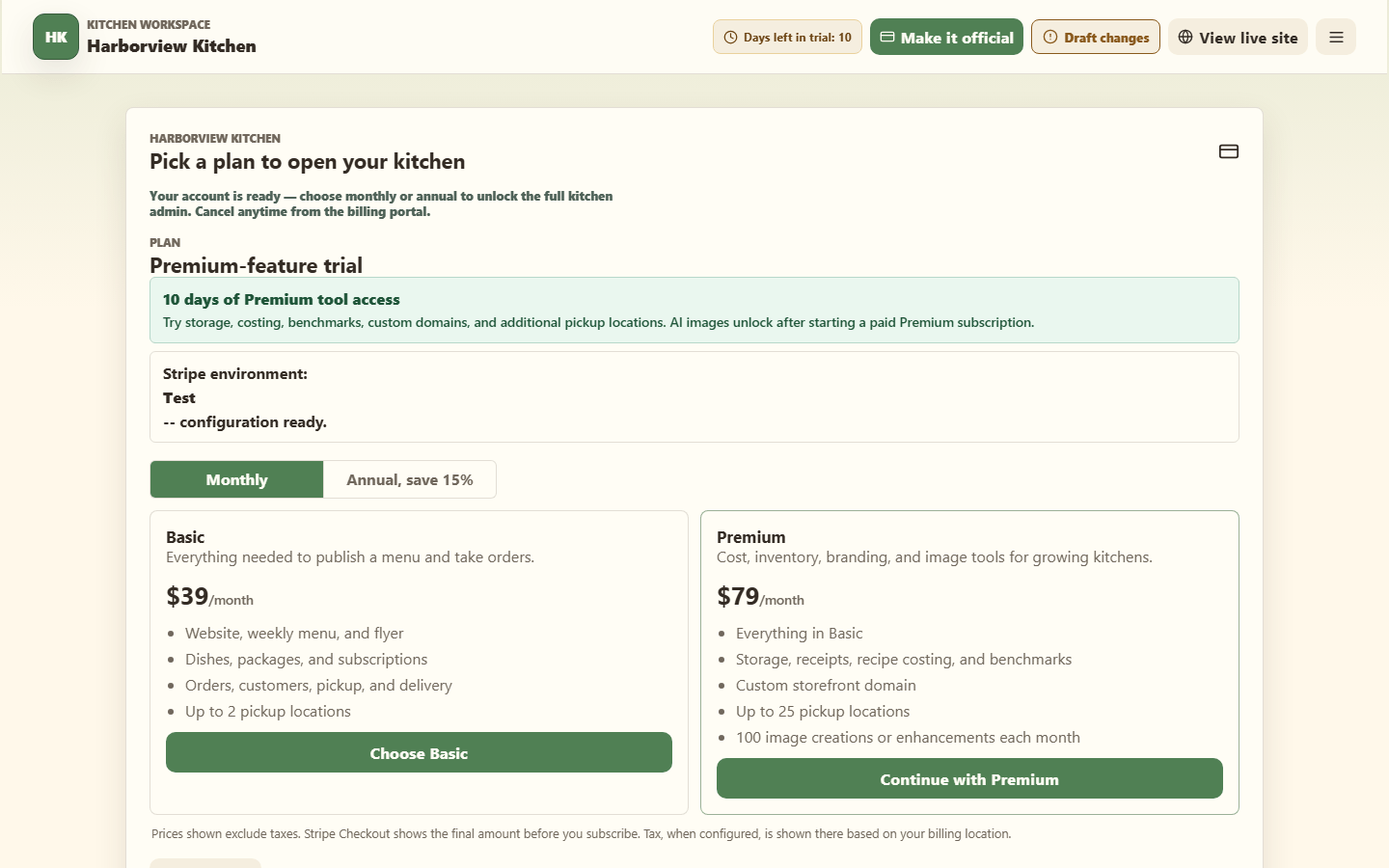
Only the kitchen owner can start Checkout or manage the Stovefront subscription. Prices on the plan cards exclude taxes. Stripe Checkout shows the final amount before you subscribe, including tax when it is configured for your billing location.
After Stripe Checkout
After payment, Stripe returns you to Account → Plan & billing. Stovefront shows Payment received and refreshes your subscription status several times over the next few seconds while Stripe confirms the subscription. A short delay before the plan changes to active is normal.
While Stovefront says it is finishing up with Stripe, do not select a plan again or open another Checkout. Wait for the automatic refresh so the subscription you just purchased can attach to your kitchen. If the old plan still appears after a minute, reload Plan & billing and check again before trying another purchase.
When the subscription is active, Plan & billing shows the current plan, monthly or annual cadence, and renewal date. Use Manage billing to change an existing subscription, update its payment method, or cancel it in Stripe's billing portal instead of starting a new Checkout.
If you leave or cancel Checkout before paying, Stovefront shows Checkout cancelled and no charge is made. You can choose a plan again when you are ready.
Two kinds of money, kept apart
Your Stovefront plan is what you pay us. It has nothing to do with what customers pay you for food — that goes directly to you on your own payment method. Stovefront never touches it.
Related
What your free trial includes · Manage billing details · Plan limits