Create a menu item
A menu item is the sellable version of a dish for a particular menu week. It has its own price, quantity, and availability, and it inherits your kitchen's pickup day, window, and order cutoff automatically.
Fastest path: add a saved dish to the week
- Open Menu, choose the week you are planning, and select Add from library.
- Select a saved dish, then choose Add to week of …. If your kitchen has more than one pickup day, pick which day; otherwise the dish is added immediately.
- That's it — the item is scheduled with your pickup window and cutoff. A confirmation shows the pickup date, with Undo if you tapped the wrong dish. Back to Menu returns you to the week.
Or build one in the menu composer
- Open Menu and select Add item. The composer opens in a panel beside the menu; the photo and the pickup line sit on the left, the details on the right.
- Choose a saved dish or enter the food details directly.
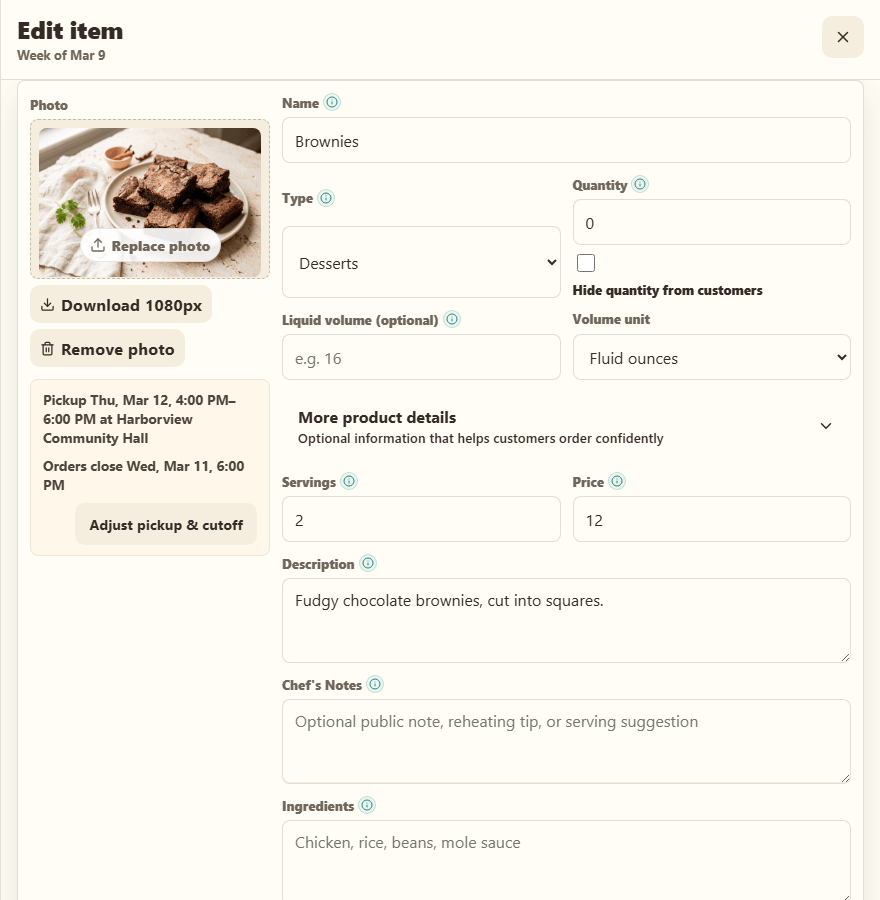
- Set the price, quantity available, and category. The pickup and cutoff line is prefilled from your schedule — select Adjust pickup & cutoff only if this item needs different timing.
- Upload a photo. Depending on Website → Design → Homepage → AI photo preferences, keep it as-is, enhance it with one image credit, or let Stovefront enhance it automatically.
- Save the item, then preview it in the customer storefront. Close the panel with the X or Esc; if you have unsaved changes, Stovefront asks before discarding them.
Editing and everyday changes on the card
Each dish card in the week shows its price, availability and description. Use the − and + controls to change the quantity on the spot, Edit to open the composer, and the … menu for Add to Flyer, Clone and Delete. Ingredients, dietary tags and chef notes sit behind Ingredients and notes on the card.
For sizes, add-ons, allergens, reheating notes, quantity rules, or a special-request question, open More product details in the editor. See Add choices and ordering details.
Common mistake
Saving a dish alone does not add it to the live menu. The dish must be added to a menu week, and that week must be published with Publish week.
Limits
A menu week holds up to 100 items. If you hit that, you are almost certainly better served by packages than by more individual items.