Cancel or refund an order
Canceling and refunding are separate actions:
- Cancel order removes the order from the active queue. It does not return money.
- Refund customer returns an eligible Stripe card payment. It does not cancel the order.
If a paid order is called off, complete both actions when appropriate.
Cancel an order
- Open Orders.
- Find the order and open its More actions menu.
- Select Cancel order.
- Review the confirmation, then select Cancel order again.

The order moves out of Active, but its items, customer details, notes, and history are kept under All. To restore it, open All, find the canceled order, and select Reopen.
Canceling releases its reserved item quantities back to availability, but it does not return a payment. Before reopening an older order, Stovefront checks that enough inventory remains.
Refund a Stripe card payment
Refund customer is available when all of these are true:
- The order was paid through Stovefront's Stripe Checkout.
- Its Stripe payment status is Paid.
- A refundable balance remains and another refund is not processing.
- You are a kitchen owner or admin with a verified email address.
- Your trial, paid plan, or included access is active.
- In Orders, open the paid order's More actions menu.
- Select Refund customer.
- Choose Full remaining amount or Partial refund.
- Choose the reason: Customer requested it, Duplicate payment, or Suspected fraud.
- Check the amount, then select the button showing the exact refund total.
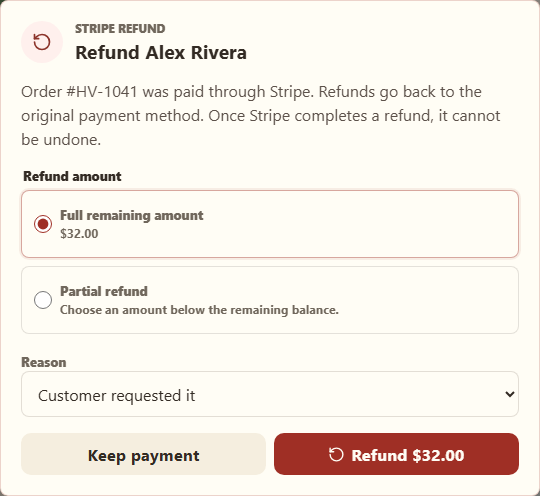
A completed refund goes back to the original payment method and cannot be undone. A partial refund leaves the remaining paid balance available for a later refund.
Refund a direct payment
Stovefront cannot return cash or payments sent through Venmo, Zelle, Cash App, or PayPal. Arrange that refund in the service where you received the money, then keep a private note on the order if your records need the detail.
Understand refund status
| Status | Meaning |
|---|---|
| Refund processing | Stripe has not finished. Wait; do not start another refund. |
| $... refunded | A partial refund succeeded and a balance remains. |
| Fully refunded | The full paid amount was returned and payment status is Refunded. |
| Refund needs attention | The latest attempt failed or was canceled. Earlier successful partial refunds still count. |
Customers can see processing and completed Stripe refunds in My orders. Their bank or card provider controls when the credit appears.
Related
Troubleshoot customer payments and refunds · Connect Stripe and receive card payments · Understand the order lifecycle