Save and reuse a menu
A saved menu is a week you have already built, kept under a name so you can bring it back later: a holiday menu, a summer menu, a light week. It holds the dishes and packages, their quantities, the pickup days, window and last-order rule that were in force, and the week's plan capacity, summary and notes.
Applying a saved menu never publishes anything. It fills the week you are looking at as a draft, and you publish it yourself when it is ready.
Save the week you are looking at
- Open Menu and go to a week that already has its dishes.
- Select Saved menus in the week header, then Save this week as a menu. You can also use Save as menu at the bottom of Week settings.
- Give it a name (and a short description if it helps you find it later), then select Save menu.
The week header now shows Based on with the menu's name. If you keep changing the week after saving, choose Update from this week in the Saved menus panel to bring the saved copy up to date.
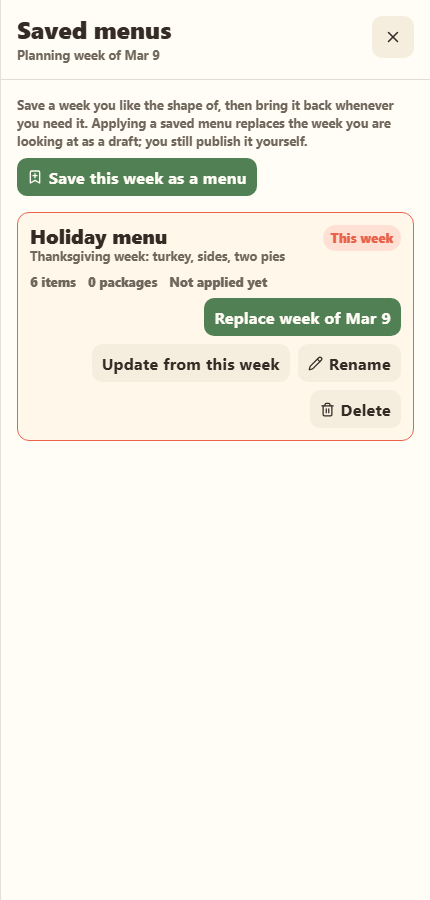
Apply a saved menu to a week
- Move to the week you want to fill.
- Select Saved menus, then Apply to week of … on the menu you want.
- If that week already has dishes, Stovefront asks before replacing them.
Every pickup and last-order time moves to the matching day of the new week, so a Thursday pickup stays a Thursday pickup. If your kitchen's last-order rule has changed since you saved the menu, items that followed the old rule follow the new one; items you set by hand keep their own times.
Review the draft, then select Publish week.
Save just the settings
Sometimes it is the setup you want back, not the dishes: a market week with Friday pickup and an early cutoff, or a holiday week with a bigger plan capacity. Week settings can be saved on their own.
- Open Week settings on a week whose settings are the way you want them.
- Under Settings presets, select Save these settings as a preset and name it.
- On any other week, open Week settings and select Apply to week of … on that preset.
A settings preset carries the pickup days, window and last-order rule, the plan capacity, the meal plan summary and customer note, and your private planning notes. It never touches the week's dishes: they stay, and any that followed the old pickup schedule move to the new one, just as when you save the schedule by hand.
Good to know
- Dish details come from your Dish Library. A saved menu remembers which dishes it holds, not their prices or photos. Edit the dish and every menu that uses it follows. If a dish has since been deleted, the item still comes back, unlinked, and the confirmation names it.
- Copy week is the same idea without a name: it copies the week you are looking at to the next empty week as a draft.
- Deleting a saved menu removes only the saved copy. Weeks you built from it are not changed.
- You can keep up to 50 saved menus.
Related
Build and publish a menu week · Create a menu item · Set order cutoffs